


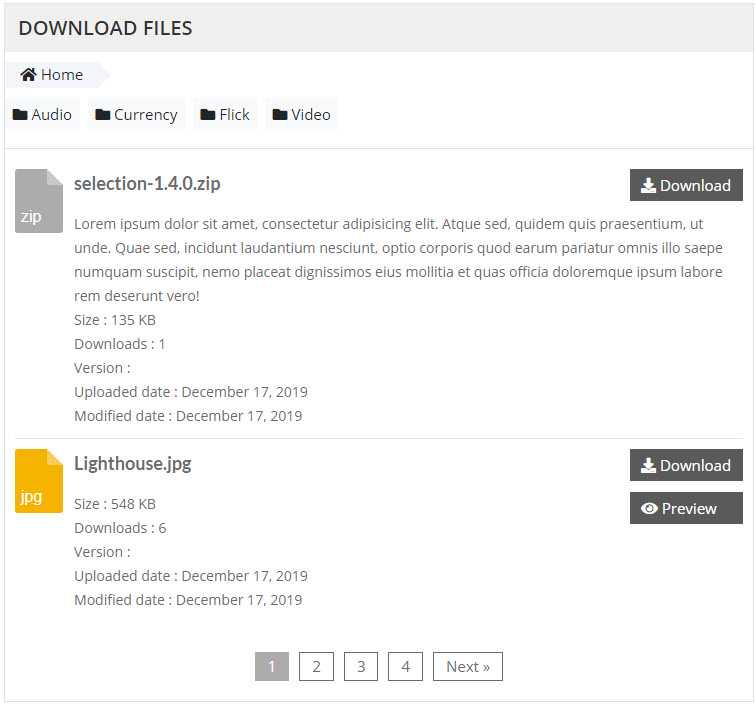

WordPress File Download lets you manage files and download file at frontend
It allows you to create folder, upload, update, remove file easily …
Main features: WordPress File Download
- Work on WordPress 4.0+
- Drop & drop uploader
- Remote uploader
- Move/Copy/Edit folders/files
- Download multiple files as .zip archives at backend
- File preview
- Download tracking with Google Analytics
- File tagging
- Add Versions for file
- New files Widget
- Top downloads Widget
- IP block option to prevent downloads from unwanted IP addresses
- AJAX multiple files to upload
- Display single file/folder
- Display multiple folders/files on same place
- Ajax search files
- Widget vs Shortcode ready
- Multiple roles unlimited users
- File download count
- Custom templates
- Support default/table theme for displaying folder
- Support statistics and charts
- Responsive layout
- Cross Browser
- WPML ready
- Documentation included
Demo information
frontend :
https://demo.zufusion.com/wfd/download-files/
https://demo.zufusion.com/wfd/searh-files/
backend:
https://demo.zufusion.com/wfd/wp-admin
username: demo
password : demo
Changle Log
= 1.0.1 =
* Updated bootstrap 5
* Updated main layout
* Fixed modal folder/file
* Updated core
* Added pot template language
= 1.0 = * First release
2 thoughts on “WordPress File Download”
Leave a Comment Cancel reply
You must be logged in to post a comment.
Hi, i have a few pre-buy questions about this plugin.
1. On the demo home page, there are ‘Audio’ ‘Currency’ ‘Flick’ ‘Video’ folders, but i don’t see any settings to change that on the admin demo account. How to choose which download files folders to show at the home page?
2. Can i disable the ‘Remote Upload’ function on the Files Manager page?
3. Is this plugin compatible with latest WP 5.8+ version?
Thanks!
HI
1. On the demo home page, there are ‘Audio’ ‘Currency’ ‘Flick’ ‘Video’ folders, but i don’t see any settings to change that on the admin demo account. How to choose which download files folders to show at the home page?
– You can right click on file, folder to change
– The plugin uses shortcode to display file or folder. so you can copy this shortcode by right click on file or folder to copy the shortcode
2. Can i disable the ‘Remote Upload’ function on the Files Manager page?
– Currently, the plugin is not have the option to disable it yet, i will add it later
3. Is this plugin compatible with latest WP 5.8+ version?
– It is working fine